When I met git, I fall in love in the moment. You can read any
apointments I wrote previously
here,
and
here
(in spanish) but today I’ll explain how to restore files and directories
from previous commits that it was deleted by a mistake or intentionally
in the past. It’s quite easy
to revert
or reset
a single file from history, but what about pulling an entire directory
out of the history? The solution is simple: git checkout ID_of_commit -- /path/to/dir This will restore the directory from the given “commit
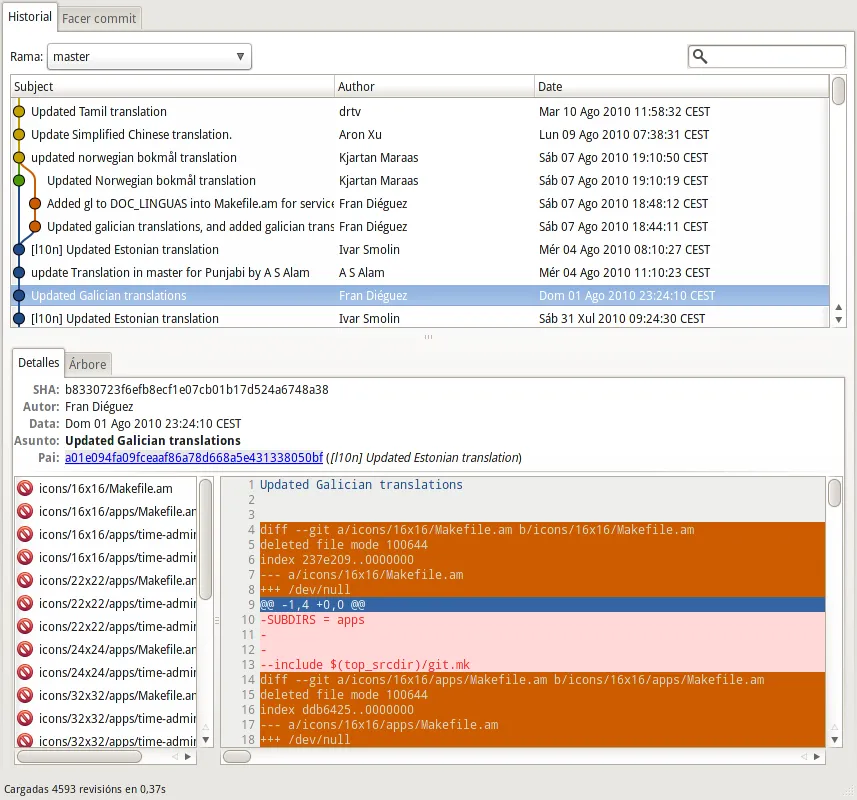
with ID” in the /path/to/dir. But, let me show you a mistake I made in
a commit into the gnome-system-tools repository: I send a translation
for a GNOME app in Galician and (I don’t know how) accidentally, I
deleted the directory icons. For make this more complicated there were a
lot of commits ahead of my commit. In the previous image the highlighted
commit is where I deleted the directory. If you issue at you terminal
within the app directory:
    ➜  gnome-system-tools git:(master) git reflog
    cc9cead HEAD@{0}: commit: Restore deleted icons directory, deleted by a mistake.
    77f6382 HEAD@{1}: pull : Fast-forward
    a01e094 HEAD@{2}: a01e094fa09fceaaf86a78d668a5e431338050bf: updating HEAD
    b833072 HEAD@{3}: b8330723f6efb8ecf1e07cb01b17d524a6748a38: updating HEAD
    e6808e5 HEAD@{4}: pull : Fast-forward
    b833072 HEAD@{5}: b8330723f6efb8ecf1e07cb01b17d524a6748a38: updating HEAD
    e6808e5 HEAD@{6}: pull : Fast-forward
    fa069b2 HEAD@{7}: commit: Added gl to DOC_LINGUAS into Makefile.am for services and time documentation
    5cc13f5 HEAD@{8}: commit: Updated galician translations, and added galician translations for time and services documentation
    2915e6e HEAD@{9}: pull : Fast-forward
    b833072 HEAD@{10}: commit: Updated Galician translations  <------ this is the commit
    a01e094 HEAD@{11}: pull : Fast-forward
you’ll see the ID that points to that commit. So applying the ^ modifier to the damned ID I can obtain the previous commit ID, this one has the icons directory and now is when the magic comes in:
➜  gnome-system-tools git:(master) git checkout b833072^ -- icons/
➜  gnome-system-tools git:(master) ✗ git status
# On branch master
# Changes to be committed:
#   (use "git reset HEAD ..." to unstage)
#
#   new file:   icons/16x16/Makefile.am
#   new file:   icons/16x16/apps/Makefile.am
#   new file:   icons/16x16/apps/time-admin.png
#   new file:   icons/16x16/apps/time-admin.svg
#   new file:   icons/22x22/Makefile.am
#   new file:   icons/22x22/apps/Makefile.am
#   new file:   icons/22x22/
Tagged
A .gitignore that is only yours
Ignoring files in a shared repository without touching the shared .gitignore — the two ways Git offers, and the one that silently switches off your global ignores if you are not expecting it.
Migrate Subversion repository to Git without loosing data
The full procedure we used to move a company's Subversion repositories to Git with the history intact, written down because it is not straightforward.
Gestión de Branches y Tags con Git (II)
Segunda parte de la serie sobre Git: cómo encajan branches y tags en el ciclo de vida del software y cómo manejarlos a diario.